Signature: 7fR2jY+tNzNDf0am3D/hcF/YkCl8+Kd4tR2rQCMzzpreLY24tVOjRCobxIXXSJsxSab/9T9sC85Cz6qY0jF8pb1/eUFJ8xFLb+0T+z9FNgB9gG5B7+cXnmdMX9jsYIvKbAHtd1RhvpL2GLg6S0HwgeAAekqDh5EPyFsCRZFiwTUEr4UjzXMoyJ3FzK/bzMMO
In 2026, making videos with AI feels like magic that keeps getting better. People can now create smooth, story-filled movies right from their computers. The big secret to great results is something called context match. This special feature helps the AI remember what things look like from one moment to the next.
It makes characters stay the same, objects look right, and scenes feel real across every frame. Beginners and creative friends love it because their videos move naturally without weird jumps or changes. This guide will walk with you like a helpful friend. You will learn simple ways to get perfect consistency in your AI videos and feel excited to try it yourself.
What Is Context Match in AI Video Generation
Context match is like giving the AI a good memory for your video ideas. It lets the computer understand and keep important details the same as the video plays. For example, if you show a picture of a happy girl with curly hair, the AI uses that to make sure she looks just like herself in every new frame.
It works with references such as starting images or short video clips. The AI studies these and then builds new parts that fit together nicely. This means faces do not suddenly change shape, clothes stay the right color, and backgrounds feel steady.
Because of smart processing inside the tools, context match connects everything smoothly. It is the reason why videos now look more like real films instead of choppy dreams. You can trust the AI to hold onto your story without forgetting the little things that make it special.
Why Context Match Has Become Essential in 2026
Longer videos with real stories are very popular now. People want to make short films, school projects, or fun marketing clips that last more than a few seconds. Context match helps a lot here because it cuts down on strange mistakes like faces that melt or objects that float away.
In the past, AI videos often looked broken after a short time. Now, with better context match, creators can build whole tales where everything feels connected. Teachers can make clear lesson videos. Small businesses can show their products in many scenes without starting over each time.
This matters because good consistency makes your work look professional. Viewers stay interested when the video flows well. That is why context match turned into a must-have skill for anyone who wants to create with AI in 2026.
Key 2026 Advancements Powering Better Context Match
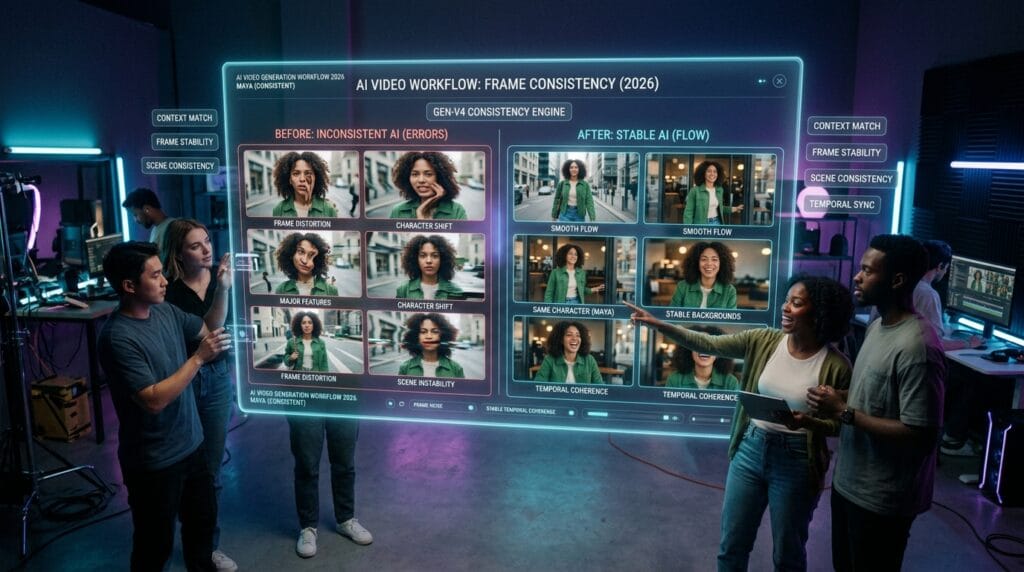
This year brought wonderful improvements that make context match stronger than ever. Motion now looks smooth and natural, like real life movement. Faces and objects stay much more steady across shots. Generation happens faster too, so you do not wait long for results.
Prompts work better because the AI understands your words more clearly. You can control the very first and last frames with care, which helps stories connect nicely. Many platforms added easy editing tools that let you fix small problems right inside the program.
These changes together mean even simple ideas turn into beautiful videos. Over time, creators notice their work feels more reliable and fun to make.
Unique Angle 1: Strategic Reference Layering for Superior Consistency
Most people use just one picture as a guide. But you can get much better results by layering several references together. Start with a clear face photo, then add another for clothes, and maybe one more for the setting. The AI combines them like puzzle pieces to understand your idea deeply.
This way gives stronger context match because the computer has more helpful information. Try different strengths for each layer so the main character stays perfect while the background adds nice details.
Many guides miss this trick, but it makes a huge difference. Your videos gain a polished feel that stands out.
Unique Angle 2: Mastering Start and End Frame Control for Narrative Flow
Good stories need gentle beginnings and endings that flow together. In 2026, you can pick exact starting and ending frames to guide the AI. Set the first frame with your hero in a calm pose, and the last one with a happy smile or important action.
This control creates seamless transitions between parts of your video. The motion feels planned and natural, just like in big movies. It is an area many beginners overlook, yet it brings storytelling magic.
Practice with short clips first. You will see how these frames hold the whole story in place.
Unique Angle 3: Rapid In-Editor Fixes for Consistency Issues
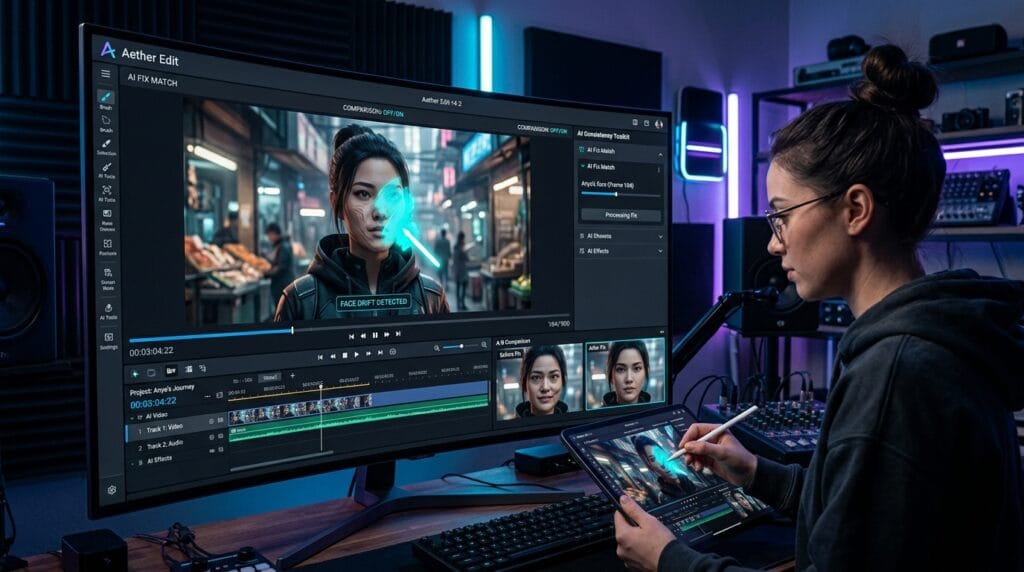
Sometimes small problems appear, like a face that drifts a little or an object that looks off. The good news is 2026 tools have quick fixes built right in. You can brush over a problem area and tell the AI to match the rest of the video.
These edits save lots of time because you do not need to generate everything again. Face drift, odd movements, or light changes become easy to correct.
Friendly tools let you zoom in, adjust, and preview right away. This means your final video stays clean and consistent without extra stress.
Unique Angle 4: Building Multi-Clip Pipelines While Preserving Context
Long videos often come from several shorter pieces joined together. Context match shines here when you plan your pipeline carefully. Generate one clip, then use its last frame as the start for the next one. Keep the same reference pictures across all parts.
This keeps the whole project feeling like one smooth story. Tools now help you line up clips easily while holding onto character details and scene colors.
Small businesses and students use this for complete projects. It turns separate ideas into one beautiful video without losing the match between sections.
Unique Angle 5: Advanced Prompt Techniques Optimized for 2026 Context Match
Simple words still work, but a few smart additions make prompts much stronger. Describe your main subject clearly at the beginning, then add details about movement and lighting that stay the same. Use the same exact words for important things like hair color or shirt style in every prompt.
Add gentle instructions like “keep the same face and clothes” or “smooth motion with no changes.” These help the AI focus on consistency.
Try short test prompts first to see what works best. Over time, you will create your own favorite patterns that give reliable, beautiful results.
Unique Angle 6: Achieving Impressive Results as a Complete Beginner
Even if you never tried AI video before, 2026 makes it welcoming. Start with very simple ideas like a character walking in a park. Use one clear reference picture and short prompts. Many people get nice results on their first or second try now.
The key is a friendly mindset. Be patient, try small steps, and celebrate small wins. Recent improvements help students make school stories, teachers create fun lessons, and families record happy memories.
You do not need fancy skills. Just curiosity and a willingness to learn as you go. Soon your videos will look polished and full of life.
Complete Step-by-Step Workflow for Optimal Context Match
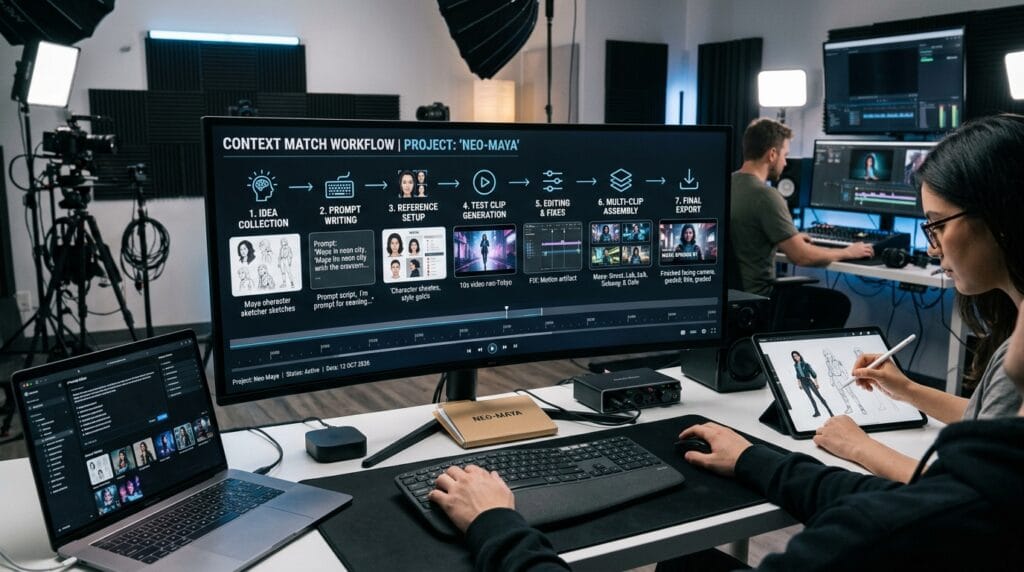
Here is a full, easy process you can follow every time. First, gather your ideas and collect a few reference pictures or short clips. Think about your story from beginning to end.
Next, write a clear prompt with all the important details. Set your start and end frames if the tool allows. Generate a test clip and check the context match.
After that, make small fixes in the editor if needed. Build more clips using the previous ones as guides to keep everything consistent. Join them together smoothly.
Finally, preview the whole video, adjust lighting or speed if you want, and export it. This workflow brings together all the ideas we talked about. It helps you create with confidence and joy.
Best Tools and Platforms for Context Match in 2026
Many good options exist that focus on strong consistency. Some shine with fast generation and easy controls. Others offer great reference features and smooth motion. Look for tools that let you upload multiple images and adjust frames precisely.
Popular choices give different strengths like longer clips or quick editing. Think about what you need—speed, quality, or simple use—and pick one that feels right. Most have free ways to start so you can test without worry.
The field keeps growing, so try a couple to see which matches your style best. All of them support context match in wonderful new ways this year.
Pro Tips for Maximizing Results and Future-Proofing Skills
Keep your references organized in one folder so you can find them fast. Save successful prompts in a note file to reuse and improve later. Watch how light and colors stay steady across clips.
Learn one new trick each week, like better layering or prompt anchors. Join friendly online groups to share what you discover. As tools change, focus on understanding context match basics. These stay useful no matter what updates come.
Small habits like previewing early and fixing little issues quickly lead to big improvements over time.
Common Mistakes That Break Context Match (and How to Avoid Them)
One big mistake is changing descriptions too much between clips. The AI gets confused if you say “blue shirt” one time and “green top” the next. Always use the same words for key details.
Another error is using blurry or busy reference pictures. Clear, simple images work much better. Also, trying very long videos too soon can cause problems. Start short and build up slowly.
Forgetting to check the start and end frames often leads to sudden jumps. Set them carefully and preview connections. Avoid these by planning ahead and testing small parts first. Your consistency will improve right away.
[Add your own example or image here]
FAQ
What exactly does context match fix in videos?
It keeps characters, objects, and scenes looking steady so nothing changes strangely from frame to frame. This creates smooth, enjoyable watching.
How long does it take to learn good context match?
Many beginners see nice improvements in a few practice sessions. Focus on one skill at a time and be kind to yourself as you learn.
Can I use context match for school or work projects?
Yes! It helps make clear presentations, story videos, and product shows that look professional and hold attention.
Do I need expensive tools to start?
No. Many platforms offer free trials or basic versions that already support strong context match for learning.
What if my video still has small glitches?
Use the quick in-editor fixes. They handle most issues without starting over.
How do I keep the same character across many clips?
Layer good reference pictures and use the exact same description words in every prompt. Set matching start and end frames too.
Will context match keep getting better?
Yes, tools improve every few months. Learning the basics now prepares you for even nicer features later.
Is it okay to mix different tools in one project?
Absolutely. Many creators do this to get the best parts from each for perfect consistency.
Conclusion and Next Steps
Context match brings wonderful consistency to AI video making in 2026. It turns simple ideas into flowing stories with steady characters and smooth motion. You learned definitions, why it matters, new advancements, special techniques, full workflows, tips, and ways to avoid problems.
Now it is your turn to try. Pick one small idea today, gather a reference picture, and follow the step-by-step process. Watch how your videos come to life with natural flow. Each time you practice, you will feel more confident and creative.
The future of video making is bright and open to everyone who wants to explore. Have fun, share your creations, and keep learning. You can make beautiful things!
Disclaimer
This article shares friendly general tips and ideas about context match in AI video generation for 2026 based on current knowledge. Technology changes fast, so always check the latest features in your tools. The guide is for learning and fun only, with no connection to any specific platforms, and results may vary. Please use these ideas kindly, test small steps, and enjoy your own creative experiments!
Explore More
- Krowd App: The Ultimate Guide to Features, Benefits, and Getting Started in 2026
- Hydrawise App: Complete Guide & Review 2026
- Productivity and Success: 10 Powerful Strategies to Achieve More Every Day
About the Author