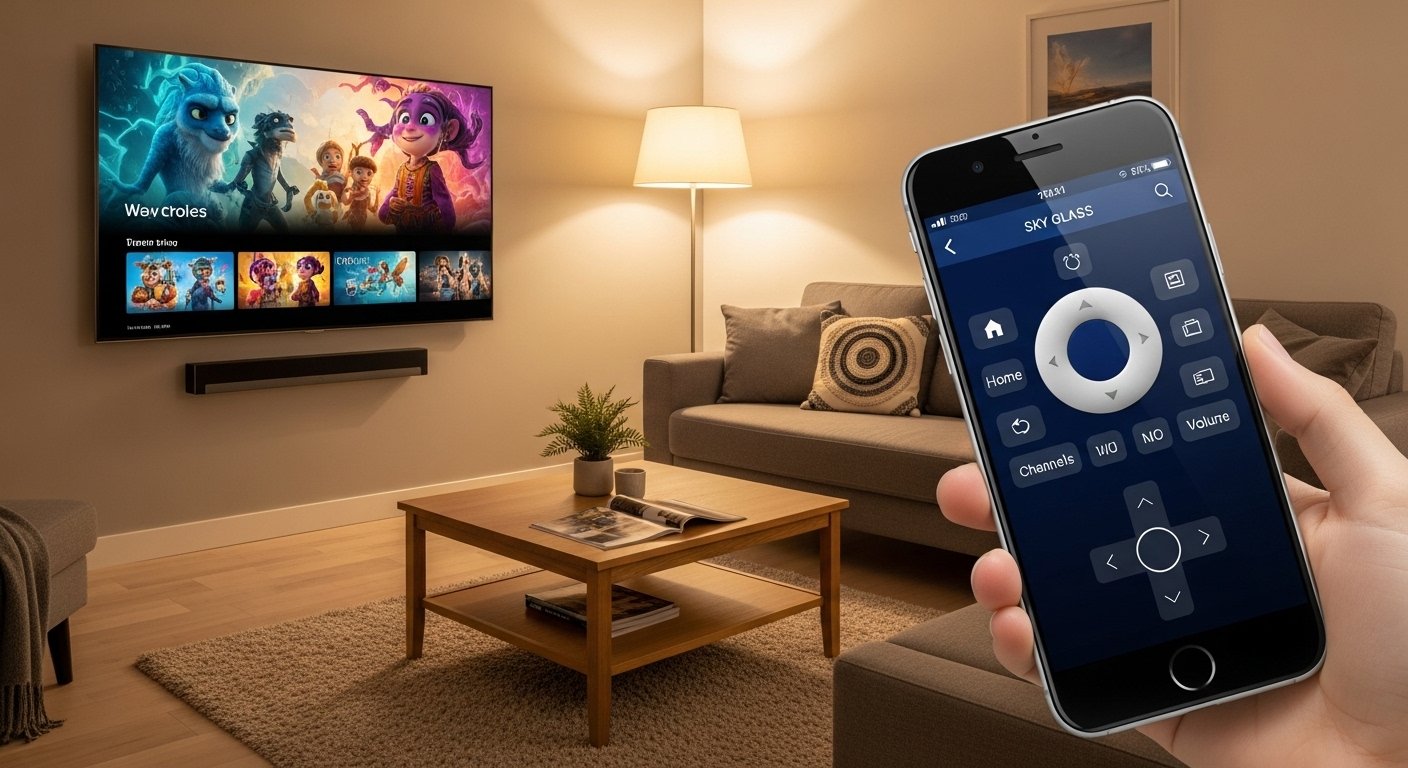
The Sky Glass App: Control & Stream Your TV Easily is a helpful tool from Sky that makes watching TV simpler and more fun. Many people call it the Sky Remote app, and it works perfectly with Sky Glass TVs and Sky Stream devices. This app turns your phone or tablet into a smart remote control. You can change channels, play or pause shows, search for content, and do much more without looking for the physical remote.
Sky launched this app in late 2025 to give users a better way to enjoy their entertainment. It is free to download and easy to use. If you have a Sky Glass TV (the all-in-one streaming TV with no dish needed) or a Sky Stream puck (the small box that brings Sky to any TV), this app is made for you.
In this article, we will explain everything about the Sky Glass App in very simple words. We will cover what it is, why it is useful, how to get it, how to set it up, its main features, tips for the best use, and more. By the end, you will know exactly how this app can make your TV time easier every day.
What Is the Sky Glass App?
The Sky Glass App, officially known as the Sky Remote app, is a mobile application from Sky. It lets you control your Sky Glass TV or Sky Stream device right from your smartphone or tablet.
Sky Glass is a special TV that streams all your favorite shows, movies, sports, and apps over the internet. It has Sky channels built in, plus popular services like Netflix, Disney+, Prime Video, and more. Sky Stream is a small device (called a puck) that you plug into any TV to get the same Sky experience without buying a new TV.
Before this app came out, you needed the physical Sky remote to change things on your TV. Now, with the app, your phone becomes the remote. This is great when:
- Your remote is lost (maybe under the sofa!).
- The remote batteries are dead.
- You want to control the TV from another room.
- You have more than one Sky device at home.
The app is safe, official, and made by Sky. It only works if your phone and TV are on the same Wi-Fi network.
Why Use the Sky Glass App? Key Benefits
Using your phone as a TV remote feels modern and convenient. Here are some big reasons people love it:
- No more lost remote — Phones are always with us, so you can always control the TV.
- Easy control from anywhere in the house — As long as you are on the same Wi-Fi, you can change channels without getting up.
- Quick access to fun features — Search for shows by typing (faster than speaking sometimes), pause live TV, or adjust volume quietly.
- Great for families — Parents can control the TV without kids grabbing the remote. Or kids can use it to watch their shows.
- Works with multiple devices — If you have Sky Glass in the living room and Sky Stream in the bedroom, the app can switch between them easily.
- Free and simple — No extra cost if you already have Sky Glass or Sky Stream.
Many users say it makes TV time less stressful. For example, during a big football match, you can set reminders or change channels fast from your phone.
How to Download the Sky Glass App
Getting the app is very easy. It is available on both Android phones/tablets and iPhone/iPad.
For Android users:
- Open the Google Play Store on your phone.
- Search for “Sky Remote”.
- Look for the official app by Sky (it has the Sky logo).
- Tap “Install” and wait for it to download.
- The app is free.
For iPhone or iPad users:
- Open the Apple App Store.
- Search for “Sky Remote”.
- Find the one from Sky UK (check the developer name).
- Tap “Get” to download it.
- It is also free.
Important note: Make sure you download the real Sky app. Check reviews and the logo to avoid fake ones. The app launched around November 2025 and has good feedback from users.
After downloading, open the app. It will ask you to allow some permissions, like access to your local network (this is needed to find your TV).
Step-by-Step Setup Guide

Setting up the app takes only a few minutes. Follow these simple steps:
- Make sure everything is ready Turn on your Sky Glass TV or Sky Stream device. Connect both your phone and the TV to the same Wi-Fi network. This is very important — the app will not work on different networks.
- Open the Sky Remote app Launch the app on your phone.
- Let the app find your device The app will automatically search for your Sky Glass or Sky Stream on the network. It usually finds it quickly. You will see your TV’s name on the screen.
- Connect to your TV Tap on your device name to pair it. Sometimes it may ask for a code shown on the TV screen — just type it in if needed.
- Done! Start controlling Once connected, the app screen looks like your physical remote. You can now use it right away.
If you have more than one Sky device (like in different rooms), the app lets you switch between them with one tap.
Troubleshooting tips:
- If it does not find your TV, check Wi-Fi again.
- Restart the app or your phone.
- Make sure your Sky device is updated (go to settings on the TV).
- For help, visit the official Sky help page or watch their setup video on YouTube.
Main Features of the Sky Glass App
The app gives you almost all the controls of the real remote, plus some extras.
- Change channels — Tap numbers or use up/down arrows to switch live TV channels.
- Play, pause, rewind, fast forward — Perfect for live TV (pause up to 25 minutes on many channels) or on-demand shows.
- Volume and power — Turn the TV on/off, make sound louder or quieter.
- Navigate menus — Go to home screen, apps, settings, or your Playlist (where you save shows to watch later).
- Search easily — Type what you want to watch (like “football” or “new movies”). It searches across Sky channels and apps like Netflix.
- Quick settings — Turn on subtitles, audio description, night mode, or enhance speech (makes voices clearer).
- Switch devices — If you have Sky in multiple rooms, change control in seconds.
- Voice search if needed — Some phones let you use voice, but the app focuses on touch controls.
The app feels just like the physical remote but on a bigger, brighter screen. Many people say typing is faster for searches than using voice on the TV.
How the App Helps You Stream Better
Sky Glass and Sky Stream are all about streaming. The app makes streaming even smoother.
- Find shows fast — Instead of scrolling on the TV, search from your phone and start playing instantly.
- Control playback — Watching a movie? Pause from the kitchen without missing anything.
- Manage your Playlist — Add shows to watch later, then play them from the app.
- Live TV tricks — Rewind live sports or news to see what you missed.
- Multi-room fun — In a big home, control different TVs without walking around.
Since Sky Glass has no dish and uses your broadband, the app works over Wi-Fi for a clean, cable-free setup.
Tips and Tricks for Best Use
Here are some easy tips to get more from the app:
- Keep your phone charged — it is now your remote!
- Use dark mode on your phone at night so the screen does not bother others.
- Set reminders for shows from the TV guide (new feature in 2025 updates).
- If kids use the app, teach them not to change channels during important shows.
- Update the app often — Sky adds new features like better multi-device support.
- Combine with TV voice control — Use “Hello Sky” on the TV for hands-free, and app for quiet control.
Users love how the app makes family movie nights easier. No fights over the remote!
Is the Sky Glass App Safe and Reliable?
Yes, it is 100% official from Sky. It uses secure connections and only works on your home network. Sky cares about privacy — the app does not collect extra data.
Reviews from 2025 and 2026 show people are happy. Many say it fixes the “lost remote” problem forever. Some updates made it faster and added support for more devices.
Final Thoughts
The Sky Glass App (Sky Remote app) is a smart, free way to control and stream on your Sky Glass TV or Sky Stream device. It makes life easier by putting full TV control in your pocket.
If you have Sky Glass or Sky Stream, download the app today. Set it up in minutes and enjoy watching shows, movies, sports, and more without hassle.
With simple controls, quick search, and multi-device support, this app shows how Sky makes entertainment better for everyone. Try it — you will wonder how you watched TV without it before!
Disclaimer:
This article is for information only. It is not a promotion, advertisement, or affiliate content. We are not connected to Sky or any of its products. The information here is based on publicly available sources and personal experience. Always check official sources for the most accurate details. We are not responsible for any problems or losses from using the app or following this article.
Explore More
- Halfords App: Easy Car, Bike & Tech Shopping on Your Phone
- Joy App: Your Easy Way to Fun and Happiness
- Very App: Simple, Smart, and Useful for Everyone
About the Author








