
Many contractors spend too much time on paperwork instead of doing the real work they love. They chase after estimates, struggle with invoices, and wait long weeks for payments. This takes away precious hours from building and fixing things. The joist app changes that. It puts simple tools right in your hand so you can make estimates fast, send clear invoices, and get paid quicker. Think of it as a friendly helper that lives on your phone and computer. It saves time and makes your business look neat and professional.
What Is Joist App?
The joist app is a special tool made for contractors. It helps you create estimates and invoices without messy paper or confusing computer programs. Its main job is to make your daily business tasks easy and quick. You can build a job quote while you stand at a customer’s house, turn that quote into an invoice with one tap, and even let the customer pay you right away.
It works great for plumbers, electricians, painters, roofers, and many other builders. The app runs on phones and tablets so you can use it on the job site. There is also a web version for your computer at home or in the office. Everything stays in sync across all your devices. This means you never lose track of what you sent or what a customer owes you. Many people say it feels like having a smart assistant who never forgets details.
Joist App for Contractors: Key Features and Benefits
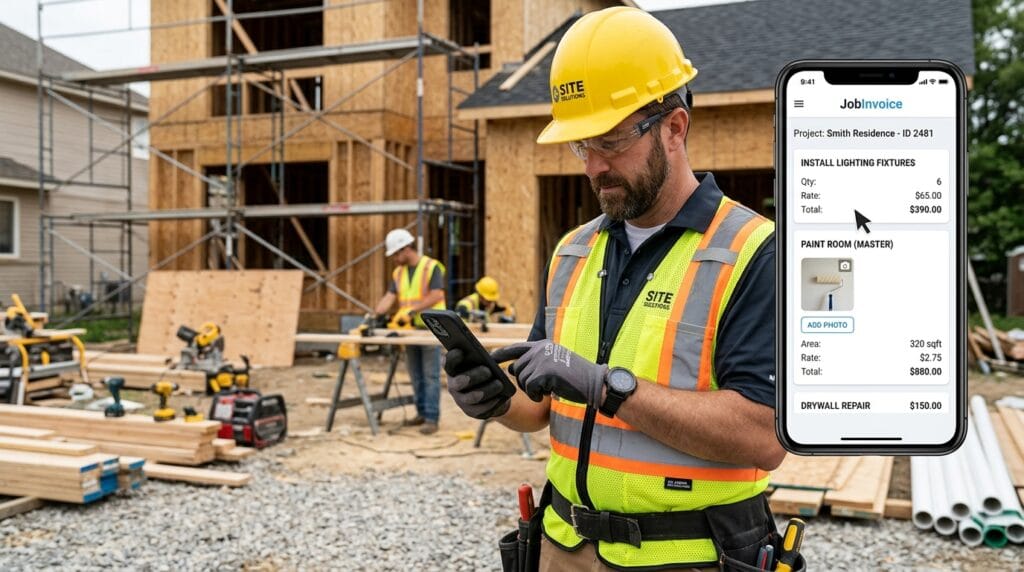
Contractors need tools that fit their busy days. The joist app for contractors shines here. You can build an estimate by picking from ready-made lists of common jobs like “install new lights” or “paint one room.” Add photos of the work area right into the estimate so customers see exactly what you plan to do.
After the customer says yes, change the estimate to an invoice in seconds. You can add contracts for signatures and ask for a deposit before you start. On the job site, you snap pictures and attach them so everything stays clear. This helps stop mix-ups later.
Many users love how the app tracks projects from start to finish. You know who paid and who still owes money. This gives you more peace of mind and lets you focus on great work instead of chasing payments. Over time, your business feels smoother and more organized.
Joist App Pricing and Cost Breakdown
People always want to know joist app cost and joist app pricing. The good news is you can start with a free option called Basics. It lets you send up to five documents each month. This works well if you are just trying the app or have a small number of jobs.
Next comes the Pro plan. It costs around $15 to $16 each month or less if you pay for the whole year. With Pro you get unlimited estimates and invoices, custom logos, online payments, and QuickBooks connection. Many contractors pick this one because it gives good value without extra limits.
The top choice is Elite at about $32 per month. It adds reports on your sales, change orders for extra work, and faster help from the team. You can try plans and see which fits your business best. Paying yearly often saves two months of cost. Choose the plan that matches how many jobs you do each month so you do not pay for things you will not use.
How to Get Started with Joist App Login and Setup
Starting with the joist app feels simple. First, go to the app store on your phone or visit the website on your computer. Sign up with your email and a strong password. The joist app login is quick once you have an account.
After you log in, add your company name, address, and logo. This makes every paper look like it comes from your real business. Next, add your common services and prices so future estimates go even faster. You can do this on your phone while sitting in your truck or on the computer at home.
The app works on both mobile and desktop, and they stay connected. New users should start by making one practice estimate. Send it to yourself first to see how it looks. Take time to explore the settings. Small steps at the beginning make everything easier later.
Joist App Interface and User Experience
The joist app interface feels clean and friendly. Big buttons and clear pictures guide you without confusion. You can move around easily even if you do not love technology. Many contractors say it feels natural after just one or two uses.
On your phone it works great in bright sunlight on a job site. The desktop version gives you a bigger screen for typing longer notes or checking reports. You can change colors, add your logo, and set up quick templates that match your style. This makes every document look professional without extra work. The design helps you finish tasks fast so you can get back to the job you enjoy.
Creating Estimates and Invoices in Joist App
Making estimates and invoices becomes quick with the joist app. Start a new estimate and pick items from your saved list. Add labor and material costs. The app adds everything up for you so there are no math mistakes. Snap photos and attach them so customers understand the job clearly.
You can include contracts and ask for a digital signature right there. When the customer approves, tap a button to turn the estimate into an invoice. Send it by text or email. Customers open it on their phone and see a neat, clear document. This whole process can take just a few minutes instead of hours of paperwork.
Best practice is to keep your price list updated. Add notes about what is included so everyone stays on the same page. These small habits make your business run smoother every week.
Joist App Payment Features and Getting Paid Faster
One of the nicest parts is joist app payment. Customers can pay you with a card or bank transfer right from the invoice you send. You turn on payments with a simple switch. Many people add a deposit request so you get money before you buy materials.
The app tracks who paid and sends gentle reminders if needed. This helps your cash flow stay healthy. You do not have to drive around collecting checks anymore. Faster payments mean you can buy supplies and pay your own bills without worry. Over time this makes your whole business feel more stable and less stressful.

Is Joist App Legit? Reviews and Real User Feedback
Many contractors wonder is joist app legit. Yes, it is a real company that thousands of people use every day. On app stores it earns high marks around 4.6 and 4.7 stars from more than twelve thousand reviews.
People praise how easy it makes professional-looking papers and quick payments. They like the mobile freedom and time it saves. Some mention they wish support answered even faster on busy days. A few say payment fees feel high if customers use credit cards. Overall most users feel happy and say the app helps their business grow. Real stories from other contractors show it works well for small teams and solo workers.
Joist App Customer Service and Support Options
The joist app customer service team helps through live chat inside the app and email at [email protected]. They answer seven days a week. Many users say responses come within a day or two. You can also find helpful guides and video lessons on their website.
If something feels stuck, the in-app chat is the fastest way to start. Write clear details about your question so they can help right away. Good support makes learning the app even easier.
Troubleshooting Common Issues: Joist App Not Working
Sometimes the joist app not working because of a weak internet connection. Close the app and open it again. Make sure your phone or computer has the latest update.
Login trouble often clears up if you check your password or reset it. Sync problems usually fix when you go back online and give the app a moment to catch up. If pictures will not load, check that you gave the app permission to use your camera.
Write down what happened and when so you can tell support if you need them. Most small glitches go away with a quick restart. Staying updated helps prevent many issues.
Joist App for Desktop: Web Access and Cross-Device Use
The joist app for desktop lets you work on a big screen at home or in the office. Everything you do on your phone shows up on the computer and the other way around. This cross-device use feels seamless.
Office workers like typing longer descriptions on a full keyboard. Field workers love quick phone access. You never have to copy information from one place to another. This saves time and cuts down mistakes. Many contractors switch between phone and computer all day without any trouble.
Pros, Cons, and Alternatives to Joist App
The biggest strengths are speed, simple design, and mobile freedom. Contractors finish estimates fast and look professional. Payments come quicker too.
Some limits include single-user focus and payment processing fees. It works best for solo workers or very small teams. If you need team scheduling or heavy reporting, you might look at other tools. Compare what matters most to your daily work before choosing.

Frequently Asked Questions (FAQ)
Is Joist app free?
You can start with the free Basics plan that allows five documents a month. This gives you time to test everything.
What if I need more help setting up?
Watch short videos on their site or reach out through in-app chat. Start small and add features as you feel ready.
Can I use it offline?
You can create drafts without internet. Everything syncs when you connect again.
Does it work for big construction jobs?
It handles many projects well, but very large teams may need extra tools for scheduling.
How do I change my plan later?
Go to settings and pick a new plan. Changes usually happen right away.
What about taxes and reports?
Elite plan gives nice sales reports. You can also connect to QuickBooks for full accounting.
Is my information safe?
The app uses strong protection so your business data stays private.
Conclusion
The joist app takes away heavy paperwork so contractors can spend more time doing what they do best. It makes estimates clear, invoices fast, and payments easier. Many people feel less stress and more control after they start using it.
Give it a try with the free plan and see how it fits your days. Small steps can bring big improvements to your business. You deserve tools that make life simpler and help your work shine. Start today and enjoy more time for the jobs you love.
Disclaimer:
This article shares general information based on public details and user experiences. Always check the official Joist website for the latest features, pricing, and terms before making decisions. Results can vary by business needs.
Explore More
- Top Industries That Use Hazardous Lighting in Australia
- Cloaked App: Hide Your Digital Life in One Tap
- Fred Meyer App: How to Download & Use It in 2026
About the Author








